Program description
The Document Process Simulator is a standalone HTML and JavaScript application that displays a multi-section document and demonstrates a simulated updating process. Designed to run in a modern web browser such as Microsoft Edge or Google Chrome, it requires no Python installation, external JavaScript libraries, or web server.
The application provides a document viewer, section navigation, animated text transformations, a speed control, a status display, an activity log, and Start, Stop and Reset controls. Users can choose individual sections to inspect and enable continuous repetition for demonstrations.
During the animation, letters may be displayed alongside randomly generated digits. These changes are visual effects only; they do not constitute verified edits to a legally executed document. Reset restores the simulator’s original displayed text.
Key features
- Standalone application: HTML, CSS and vanilla JavaScript.
- Document viewer: Organises the material into separate sections.
- Animated processing: Demonstrates a simulated character-by-character transformation.
- User controls: Start, Stop and Reset.
- Adjustable speed: Changes the animation pace.
- Continuous mode: Repeats the demonstration until stopped.
- Activity log: Displays the simulator’s progress and status.
- Responsive layout: Suitable for desktop and smaller screens.
Important notice
The application is a software demonstration, not legal, accounting, banking or investment advice. Displaying proposed financial arrangements, royalties, commissions, dividends or share-related statements does not prove that an agreement has been executed, that funds exist, or that a payment is due.
The animated changes are simulated for demonstration purposes only.
A displayed proposal should not be treated as a binding agreement, proof of ownership, confirmation of funds, or an instruction to a bank or payment provider.
Copyright
Copyright © Simon Ben Gemmill.
HTML and JavaScript document-processing simulator.
How to run
- Save
document_process_simulator.htmlto your computer. - Open the file in Microsoft Edge or Google Chrome.
- Select a document section.
- Press Start Section Update to begin the demonstration.
- Use Stop to halt the animation or Reset to restore the original display.
- AI & Technology (5)
- Fantasy & Adventure (2)
- Finance & Investing (5)
- Football (10)
- Future Technology (5)
- Local Events (5)
- Premier League 26/27 (7)
- Robin Hood (2)
- Science Fiction & Space (5)
- Technology & AI (8)
- Tourism (12)
- Windsor Games (10)
- WindsorCastle.info (170)
- Blog (117)
- close (88)
- statoshi$5 (86)
- Won (33)
- statoshi$5 (86)
- Horse Racing (2)
- close (88)
- open (86)
- ssl (84)
- Royal History (6)
- Blog (117)
2026 Technology (3) Agentic AI (1) AI (5) Artificial Intelligence (3) Blog (101) British Royal Family (2) Castle (109) Changing of the Guard (2) Data Centres (1) dea (82) drink (94) England (5) food (92) football (7) Future (2) Future Technology (3) Investing (1) medication (92) Orbital Data Centres (1) Prediction (3) Premier League 26/27 (5) royal landmarks UK (2) Satellites (1) Science Fiction (2) soccer (5) Space Computing (1) Space Technology (1) SPCX (1) Starmind (1) Starship (1) Technology (2) Thca (2) visiting windsor castle (3) Windsor (103) Windsor 2026 (2) Windsor castle blog (110) Windsor Castle walk (2) Windsor Drinks (102) Windsor Great Park (2) Windsor hungry (97) Windsor Long Walk (3) Windsor tourism (3) Windsor travel blog (3) World Cup (3) World Cup 2026 (2)
-
Document Process Simulator — HTML & JavaScript
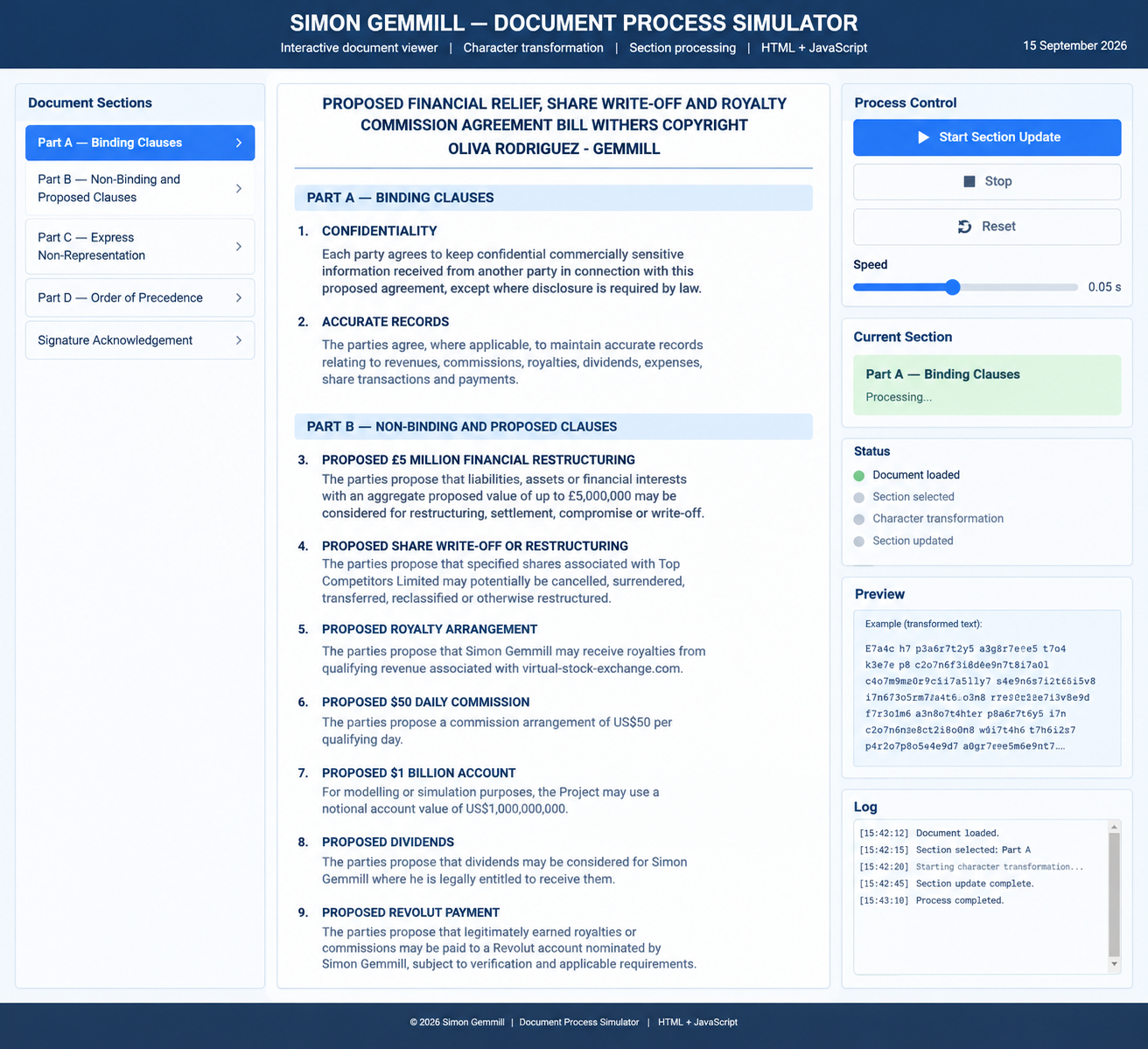
The Document Process Simulator is a standalone HTML and JavaScript application that displays a multi-section document and demonstrates a simulated updating process. Designed to run in a modern web browser such as Microsoft Edge or Google Chrome, it requires no Python installation, external JavaScript libraries, or web server.
 0
0
 20
20 20
20







Leave a Reply
You must be logged in to post a comment.